

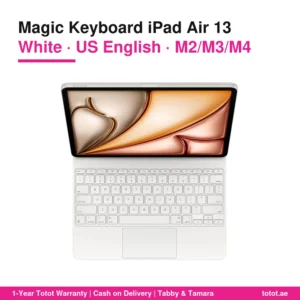
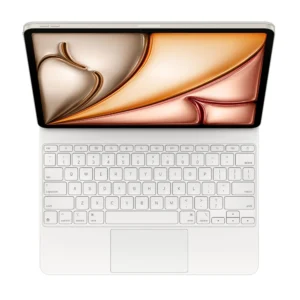
The Magic Keyboard iPad Air 13 Black turns a 13-inch iPad Air into a dark, work-ready laptop alternative: this is Apple’s own keyboard case in Black with the US English layout, US part number MGYY4LL/A. On apple.com it is called Magic Keyboard for iPad Air 13‑inch (M4), and Apple names the iPad Air 13-inch in its M4, M3 and M2 generations as the tablets it fits.
Black is the colour people pick when the iPad goes to the office, to client meetings and on business trips. The questions here are practical ones: how it looks on a meeting table, how it handles a day in a laptop bag, and what you should check before you order.

Contents
Why professionals choose the Magic Keyboard iPad Air 13 Black
Dark accessories age quietly. Pen marks, coffee splashes that were wiped late and the grey dust a bag leaves behind are much harder to see on black, so the Magic Keyboard iPad Air 13 Black still looks tidy after months of daily commuting. In Apple’s photos everything is black: the outer shell, the deck, the keys and the surround of the trackpad.
The Magic Keyboard iPad Air 13 Black also matches the iPad Air in Space Gray, the darkest of the four M4 finishes, and gives a neutral look next to a Blue, Purple or Starlight tablet. Placed on a desk next to a company laptop, a black keyboard case does not draw attention, which many people prefer in a formal setting.
The one thing black does show is fingerprint smudges and fine dust in bright light. A quick wipe with a dry or very slightly damp microfibre cloth before a meeting takes care of it.

From laptop bag to meeting table
Closed, the Magic Keyboard iPad Air 13 Black wraps the tablet as a case, and Apple says it provides front and back protection for traveling with iPad Air. That means one object to slide into a sleeve instead of a tablet plus a separate keyboard.
Opened, the Magic Keyboard iPad Air 13 Black holds the iPad on a floating cantilever arm that Apple says adjusts smoothly to multiple viewing angles. On a narrow airline tray or a hotel desk you can tilt the screen back for reading a report, or bring it more upright for a video call.
The hinge of the Magic Keyboard iPad Air 13 Black carries a USB-C connector for pass-through charging. Apple’s point is that power goes in through the keyboard, so the USB-C port on the iPad itself stays free for other accessories. For the iPad Air 13-inch (M4), Apple lists support for one external display up to 6K at 60Hz through that port, so in a meeting room you can charge through the hinge and run a monitor cable from the tablet.

Keys, function row and shortcuts
Apple lists a scissor mechanism with 1 mm travel for the keys, a short and firm press that suits long emails and reports. A 14-key function row sits above the number row; Apple says it gives convenient access to screen brightness, volume controls and other features, which is handy when you dim the screen in a dark conference room.
Below the keys of the Magic Keyboard iPad Air 13 Black is a large glass trackpad designed for Multi-Touch gestures and the cursor in iPadOS. Switching between a spreadsheet, mail and a presentation with a three-finger swipe is faster than reaching for the display every time.
This Magic Keyboard iPad Air 13 Black uses the US English layout: Latin letters only, US symbol positions and a horizontal Return key. Arabic typing works through the iPadOS software keyboard settings, but the keycaps themselves show no Arabic. Apple also sells an Arabic-layout version of this keyboard as a separate product.

Compatibility check for the Magic Keyboard iPad Air 13 Black
Apple’s tech specs page lists three iPad models: iPad Air 13-inch (M4), iPad Air 13-inch (M3) and iPad Air 13-inch (M2). The page gives 2025 as the year introduced and requires iPadOS 18.3 or later. The (M4) in the store name only marks the newest compatible tablet; an iPad Air 13-inch (M2) or (M3) is on the same list.
Two common mistakes to avoid. First, the 11-inch iPad Air needs Apple’s smaller keyboard; the black US English 11-inch version has the part number MGYX4LL/A. Second, no iPad Pro appears on the compatibility list, because Apple makes a separate Magic Keyboard for iPad Pro.
We also sell the iPad Air 13 M4 256GB Wi-Fi (USA Version) in Space Gray, Blue, Purple and Starlight. Each of them is an iPad Air 13-inch (M4), so each one works with the Magic Keyboard iPad Air 13 Black according to Apple’s list. Space Gray is the natural partner for the black model.
Figures Apple leaves out
There is no official weight and no official size for the Magic Keyboard iPad Air 13 Black: Apple publishes neither on its US store page nor on the support tech specs page. We leave those fields as not published instead of guessing. Apple does list the iPad Air 13-inch (M4) Wi-Fi model at 616 grams, but the weight of tablet and keyboard together is not given.
Compared with Apple’s iPad Pro keyboard, the iPad Air description is shorter. It does not mention backlit keys, a trackpad with haptic feedback or an aluminium palm rest, so we make no such claims for the Air model.

Who This Is Not For
- iPad Air 11-inch and iPad Pro users: neither appears on Apple’s compatibility list for this model.
- Typists who need printed Arabic characters: the keycaps are US English only.
- Late-night writers in dark rooms: Apple lists no key backlight for this keyboard.
- People who dislike visible fingerprints: black hides stains but shows smudges in bright light.
- Buyers who compare bag weight to the gram: Apple publishes no weight for the keyboard.
- Anyone who cannot update iPadOS: Apple requires iPadOS 18.3 or later.
Delivery across the UAE
The Magic Keyboard iPad Air 13 Black is the genuine Apple product, new and sealed, with the US English layout. Delivery to all of the UAE within three business days, free for orders from AED 300. You can return a defective item, or one that does not match what you ordered, within 14 days; please report any shipping damage within 48 hours of delivery.
Browse more Keyboards at Totot, or see the official Apple page for full product details.
Magic Keyboard iPad Air 13 Black technical details
- Apple product name: Magic Keyboard for iPad Air 13‑inch (M4)
- US part number: MGYY4LL/A
- Key layout: US English
- Finish: Black
- Fits: iPad Air 13-inch (M4), (M3) and (M2)
- Requires: iPadOS 18.3 or later
- Function keys: 14-key function row
- Key mechanism: Scissor, 1 mm travel
- Trackpad: Large glass trackpad, Multi-Touch gestures, iPadOS cursor
- Pass-through charging: USB-C connector on the hinge
- Stand: Floating cantilever with multiple viewing angles
- Case: Front and back protection when folded
- Introduced: 2025, per Apple’s tech specs page
- Weight: Not published by Apple
- Dimensions: Not published by Apple
- Warranty: 1-year warranty from Totot
Questions and answers
Does the Magic Keyboard iPad Air 13 Black hide stains better than white?
Yes. Ink, dye and bag dust are much harder to see on black, although fingerprint smudges can show in bright light.
Does the black keyboard match a Space Gray iPad Air?
Yes. Space Gray is the darkest iPad Air M4 finish, and the two look like a matching set when closed.
Is MGYY4LL/A the black US English part number?
Yes. Apple’s US store lists MGYY4LL/A as Magic Keyboard for iPad Air 13‑inch (M4), US English, Black.
Is the black version the same keyboard as the white one?
Yes. Apple sells one model in two colours; only the finish and the part number differ.
Will it work with my iPad Air 13-inch M3?
Yes. Apple lists the M3 model alongside the M2 and M4 versions.
Does it fit an iPad Pro 13-inch?
No. Apple makes a separate Magic Keyboard for iPad Pro.
Can I use an external monitor while charging through the hinge?
Yes. Power goes through the hinge’s USB-C connector, leaving the iPad’s own port free for a display cable.
How many keys are in the function row?
14, covering brightness, volume and other controls.




 No products in the cart.

Reviews
There are no reviews yet