

The Magic Keyboard iPad Air 13 White is Apple’s keyboard case for the large iPad Air in its light finish, with the US English layout and Apple’s US part number MDFW4LL/A. Apple sells it on its US store as the Magic Keyboard for iPad Air 13‑inch (M4), and its compatibility list names three tablets: the iPad Air 13-inch (M4), the iPad Air 13-inch (M3) and the iPad Air 13-inch (M2).
White is the softer of the two colours Apple makes, and it sits most naturally next to the lighter iPad Air finishes. Here we look at it from a home and study point of view: a tablet that becomes a writing machine on the desk in the evening and closes into a clean, protected case for the next morning.

Table of Contents
Living with the Magic Keyboard iPad Air 13 White
In Apple’s product photos the outer cover, the keyboard deck, the keycaps and the area around the trackpad are all white, so the Magic Keyboard iPad Air 13 White reads as one light object when the iPad is closed inside it. With a Starlight iPad Air the two tones sit close together; with Blue or Purple the white frames the colour of the tablet instead of competing with it.
A light surface has an honest downside. Pen ink, blue jeans dye, hand cream and the grey film from a bag all show up sooner on white than on black. A soft, slightly damp, lint-free cloth is usually enough for the palm area and the keys, and it is worth making that a weekly habit rather than waiting for marks to build up. If the keyboard will live in a work backpack next to chargers and notebooks, think about that before choosing this colour.
For students the Magic Keyboard iPad Air 13 White turns the 13-inch screen into a proper writing setup: the notes app or a document on screen, both hands on full-size keys, and the trackpad within reach of the thumbs. When the lecture or the homework is over, the keyboard folds over the display and the tablet travels as a single closed case.
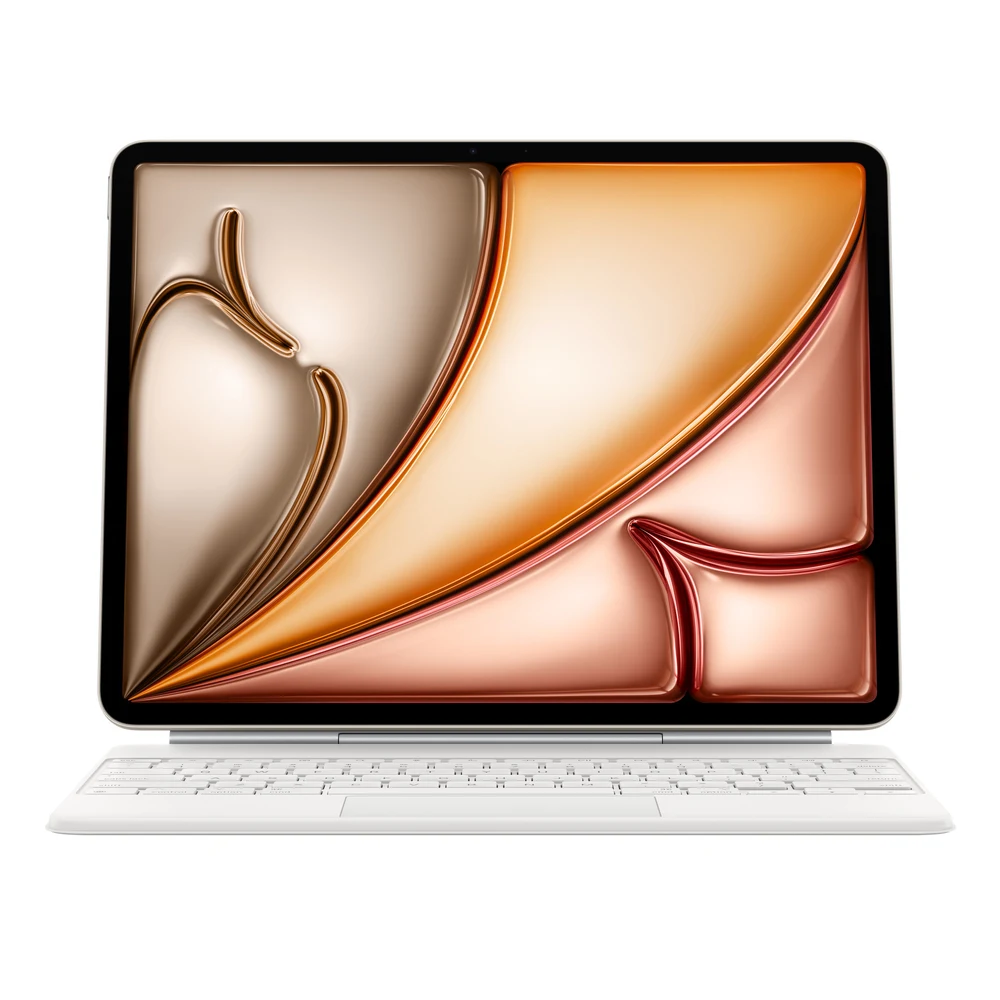
Which iPads fit the Magic Keyboard iPad Air 13 White
Apple’s tech specs page for the Magic Keyboard for iPad Air 13‑inch lists exactly three compatible models: iPad Air 13-inch (M4), iPad Air 13-inch (M3) and iPad Air 13-inch (M2). Apple gives the year introduced as 2025, and the current store name carries the M4 label because it is the newest tablet on that list. If you own any of those three 13-inch models, the Magic Keyboard iPad Air 13 White is the matching keyboard.
It is not for the iPad Air 11-inch. Apple sells a separate, smaller version for that tablet (the white US English 11-inch keyboard is MDFV4LL/A). It is also not listed for any iPad Pro: the keyboard for the iPad Pro 13-inch is a different Apple product with its own part numbers.
Apple also sets a software requirement: iPadOS 18.3 or later. Not sure which iPad you have? Apple’s instructions are to open Settings, then General, then About, and read the Model Name line.
At Totot we also sell the iPad Air 13 M4 256GB Wi-Fi (USA Version) in Space Gray, Blue, Purple and Starlight. All four are the iPad Air 13-inch (M4), so all four are on Apple’s compatibility list for the Magic Keyboard iPad Air 13 White.
Typing on the US English layout
Apple describes the keys as a scissor mechanism with 1 mm travel, which is the same short, stable key movement people know from Apple laptop keyboards. Above the letters there is a 14-key function row that Apple says gives convenient access to screen brightness, volume controls and other features, so you do not have to reach up to the screen for everyday adjustments.
This listing is the US English layout. The keycaps carry Latin letters only, with the US arrangement of the Return key and symbols. You can still add an Arabic keyboard in iPadOS and switch the input language while typing, but nothing Arabic is printed on the keys. If printed Arabic letters matter to you, Apple makes an Arabic version of this keyboard as a separate product; it is not this Magic Keyboard iPad Air 13 White.

Trackpad, hinge and pass-through charging
Below the keys of the Magic Keyboard iPad Air 13 White sits what Apple calls a large glass trackpad. Apple designed it for Multi-Touch gestures and the cursor in iPadOS, so you can select text, move between apps and drag files without lifting a hand to the display.
The iPad attaches to a floating cantilever arm that Apple says adjusts smoothly to multiple viewing angles. Apple’s keyboards for iPad attach magnetically, with no switches, plugs or pairing, so the tablet is ready to type as soon as it sits on the arm.
The hinge has a USB-C connector for pass-through charging. In Apple’s words this charges the iPad Air and frees up the connector on the iPad itself for other accessories, such as a drive or a display cable. Closed, the Magic Keyboard iPad Air 13 White folds into a case that gives the iPad front and back protection when it travels.

What Apple does not list
Apple publishes no weight and no dimensions for the Magic Keyboard iPad Air 13 White, on the store page or on its tech specs page, so we do not quote any. For reference only, Apple lists the iPad Air 13-inch (M4) Wi-Fi model at 616 grams; the combined weight with the keyboard is not published.
Apple’s description of the iPad Air keyboard also leaves out three features that it does list for the Magic Keyboard for iPad Pro: backlit keys, haptic feedback on the trackpad and an aluminium palm rest. We do not claim any of them for this model.

Who This Is Not For
- Owners of an iPad Air 11-inch or any iPad Pro: Apple does not list them as compatible.
- Anyone who wants Arabic letters printed on the keys: this is the US English layout.
- People who type in dark rooms: Apple does not list backlit keys for this keyboard.
- Anyone who will not clean a white surface: marks show sooner than on the black version.
- Buyers who need an official weight figure before ordering: Apple does not publish one.
- iPads still on an iPadOS version older than 18.3: update first, as Apple requires 18.3 or later.
Ordering the Magic Keyboard iPad Air 13 White in the UAE
You receive the genuine Apple Magic Keyboard iPad Air 13 White, new in its sealed box, with the US English layout. Delivery to all of the UAE within three business days, free for orders from AED 300. Returns are accepted within 14 days for a defective item or one that does not match your order, and shipping damage should be reported within 48 hours.
Browse more Keyboards at Totot, or see the official Apple page for full product details.
Magic Keyboard iPad Air 13 White Specifications
- Model: Magic Keyboard for iPad Air 13‑inch (sold by Apple as the (M4) model)
- Part number: MDFW4LL/A (US English, White)
- Layout: US English
- Colour: White
- Compatibility: iPad Air 13-inch (M4), iPad Air 13-inch (M3), iPad Air 13-inch (M2)
- System requirement: iPadOS 18.3 or later
- Function row: 14 keys (brightness, volume and other controls)
- Keys: Scissor mechanism, 1 mm travel
- Trackpad: Large glass trackpad for Multi-Touch gestures and the iPadOS cursor
- Charging: USB-C connector for pass-through charging of iPad Air
- Design: Floating cantilever, adjusts to multiple viewing angles
- Protection: Folds into a case for front and back protection
- Year introduced: 2025 (Apple tech specs)
- Weight: Not published by Apple
- Dimensions: Not published by Apple
- Warranty: 1-year warranty from Totot
Magic Keyboard iPad Air 13 White FAQ
Does the Magic Keyboard iPad Air 13 White show dirt quickly?
Yes, sooner than the black version. Ink, jeans dye and bag dust are easier to see on white; a soft, slightly damp cloth cleans the keys and palm area.
Does the white keyboard suit a Starlight iPad Air?
Yes. Both are light finishes, so a Starlight iPad Air and the white keyboard look like one set when closed.
Is MDFW4LL/A the white US English part number?
Yes. Apple’s US store lists MDFW4LL/A as the Magic Keyboard for iPad Air 13‑inch (M4), US English, White.
Does it fit the iPad Air 13-inch M2?
Yes. Apple lists the iPad Air 13-inch (M2), (M3) and (M4) as compatible.
Does it fit the iPad Air 11-inch?
No. Apple sells a separate 11-inch Magic Keyboard for iPad Air.
Are the keys backlit?
No backlight is listed by Apple for this keyboard, so we do not promise one.
Can it charge the iPad Air?
Yes. The hinge has a USB-C connector for pass-through charging.
Which iPadOS version does it need?
18.3 or later, according to Apple’s system requirements.


 No products in the cart.

Reviews
There are no reviews yet