


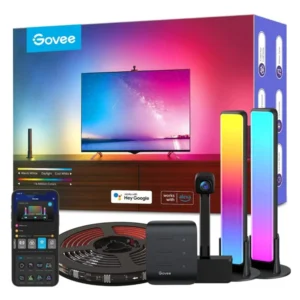
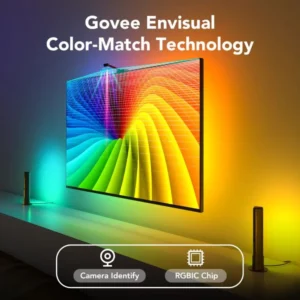
The Govee Gaming Light Kit G1 turns a PC monitor into the centre of a lit desk. In the box, as Govee’s packaging shows, are an RGBIC LED strip that sticks to the back of a 27 to 34 inch monitor and two standing light bars for either side of it. With the Govee Desktop app running on your PC, the strip and bars follow the colours on the screen; away from the PC, they run scenes and music effects from the Govee Home app.

Table of Contents
What Is in the Govee Gaming Light Kit G1
Govee’s box for this product reads Gaming Light Kit G1, for 27 to 34 inch monitors. It pairs two pieces: the G1 backlight strip, which Govee also sells on its own as the Gaming Light Strip G1, and two vertical light bars that stand on the desk. The strip lights the wall behind the monitor, while the bars add light at eye level on each side, so the colour carries across the whole desk rather than only behind the screen.
The size matters. Govee makes the G1 strip in a 24 to 26 inch version and a 27 to 34 inch version, and this Govee Gaming Light Kit G1 uses the larger one. On a 24 inch screen the strip would overhang; on a 49 inch super-ultrawide it would leave gaps.
Screen Colour Matching Through the PC
Colour matching on the Govee Gaming Light Kit G1 is done by software, not by a camera. Govee describes it as colour-matching via software that syncs screen colours along the strip, with 360-degree colour matching designed to fit all four sides of the screen. In practice, the Govee Desktop app on your Windows PC reads what is on the monitor and sends the colours to the lights.
Govee’s name for the speed of this effect is VibraMatch technology, which it describes as a high scene-changing speed with vibrant colours. The result is light that changes as the game scene changes: green around a forest level, orange when something explodes, blue when a menu fills the screen.
Scenes, Music Modes and Razer Chroma
When you are not gaming, the Govee Gaming Light Kit G1 runs on its own presets. Govee lists 123 scene modes and 4 music modes for the G1 strip, and its images show office, gaming, music and film scenes. Music modes make the lights pulse with sound, which suits a desk used for streaming or listening as much as for playing.
Govee’s images for this kit also state compatibility with Razer Chroma, so the lights can join an existing Razer keyboard and mouse lighting setup. Govee’s G1 page adds that the strip can sync with up to 10 other Govee lights, useful if you already have light panels or a floor lamp from Govee in the same room.
Fitting It to a 27–34 inch Monitor
The strip goes around the back edge of the monitor so that it glows onto the wall, and the two bars stand on the desk to the left and right. A monitor placed 10 to 30 cm from a light-coloured wall gives the clearest effect; against a dark wall or with a lot of space behind the screen, the glow is softer.
Measure the back of your screen before ordering. The Govee Gaming Light Kit G1 is sized for 27 to 34 inch monitors, and curved or very thick monitor backs can change how neatly the strip sits. Keep the cable route clear of the monitor arm or stand, and leave a free socket near the desk for the power supply.
Why a Kit Rather Than the Strip Alone
A strip on its own lights the wall directly behind the monitor. The two bars in the Govee Gaming Light Kit G1 add a second layer at the sides, which makes the effect visible from your seat even when the strip glow is hidden behind a wide screen. For a streaming setup, the bars also light the background behind you on camera.
If you want bars only, Totot also sells the Govee RGBIC Gaming Light Bars H6047 with a physical dial controller, and the Govee Gaming Light Bars Pro for a taller pair.
Who This Is Not For
Console players using the monitor with a PlayStation or Xbox should know that screen colour matching on the Govee Gaming Light Kit G1 is done by the Govee Desktop app on a PC. With a console feeding the monitor directly, there is no PC reading the image, so you would be limited to scenes and music modes. Mac users should check Govee Desktop support first, as Govee describes it as its PC app.
Govee’s pages that we could check do not publish the strip length, power supply rating, Wi-Fi band or voice assistant support for this kit, so we do not list Alexa or Google here. Anyone with a monitor under 27 inches or above 34 inches should choose a different size.
Buy the Govee Gaming Light Kit G1 in the UAE
We sell the Govee Gaming Light Kit G1 with a 1-year warranty from Totot. We deliver to every emirate in up to 3 business days, free when your order reaches AED 300. Items that arrive defective or not matching the listing can be returned within 14 days; please report any shipping damage within 48 hours of receiving the parcel.
Technical Specifications
- Product: Govee Gaming Light Kit G1 (as printed on Govee’s packaging)
- Monitor size: 27 to 34 inches
- In the kit: 1 RGBIC backlight strip (Gaming Light Strip G1) + 2 light bars, per Govee’s packaging
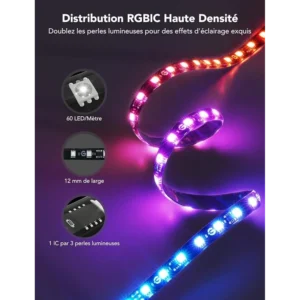
- Lighting: RGBIC segmented colour
- Screen sync: Software colour matching via the Govee Desktop PC app; 360° colour matching on all four sides of the screen
- Colour technology: Govee VibraMatch
- Scene modes: 123 scene modes, 4 music modes (Govee G1 strip page)
- Integrations: Razer Chroma; sync with up to 10 Govee lights
- Control: Govee Home app, Govee Desktop app
- Model number: Not published by Govee for the kit; Govee lists the G1 strip sold on its own as model H6609
- Strip length, power supply, Wi-Fi band, voice assistants: Not published by Govee for this kit on the pages we could check
- Warranty: 1-year warranty from Totot
The product name and kit contents come from Govee’s packaging images, and the G1 strip features (software colour matching, VibraMatch, 123 scenes, sizes) from Govee’s official Gaming Light Strip G1 page. Full details are published on the Govee Gaming Light Strip G1 page (Govee US).
FAQ
What monitor size is the Govee Gaming Light Kit G1 for?
27 to 34 inches, as printed on Govee’s box. Govee sells the G1 strip in a separate 24 to 26 inch version.
What comes in the Govee Gaming Light Kit G1?
3 pieces of lighting: 1 RGBIC backlight strip and 2 light bars, per Govee’s packaging.
Does it match the colours on my screen?
Yes, through the Govee Desktop app on a PC, which reads the screen and syncs the colours to the lights.
Will screen sync work with a PS5 or Xbox connected to the monitor?
No, not directly. Colour matching is software-based on a PC; with a console you can still use scenes and music modes.
How many scene modes does it have?
123 scene modes and 4 music modes, according to Govee’s G1 page.
Does it work with Razer Chroma?
Yes. Govee’s images for the kit state Razer Chroma compatibility.
Browse more in our Smart Light range. Every order from Totot carries a 1-year warranty covering manufacturing defects, with our 14-day return policy for defective or non-compliant items, and nationwide UAE delivery.





 No products in the cart.
Reviews
There are no reviews yet