

Anker Nano Docking Station (13-in-1, Triple Display, Built-In Removable Hub) represents the ultimate fusion of expansive connectivity, innovative modularity and a compact desktop footprint, engineered for remote professionals, multi-monitor enthusiasts, and productivity seekers who demand seamless workspace integration without clutter. Unlike traditional docking stations that are bulky and fixed, the Anker Nano Docking Station integrates a comprehensive 13-port layout, triple display support for massive screen real estate, a unique built-in removable hub for on-the-go versatility, and 100W power delivery pass-through, enabling exceptional workflow efficiency whether you are managing complex financial models across three screens, connecting multiple peripherals for a desktop-like experience, traveling with just the detached hub, or simply organizing a clean, cable-free desk setup.
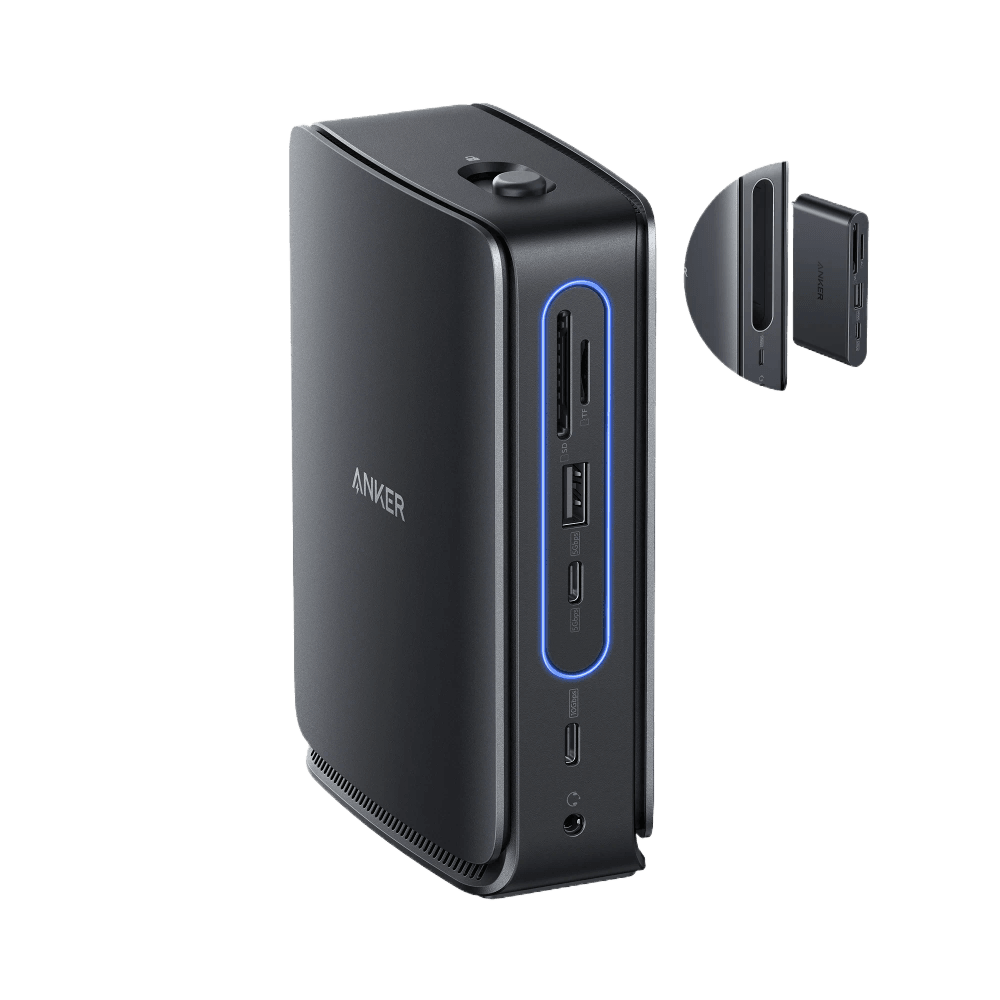
Table of Contents
Anker: 13-in-1 Comprehensive Connectivity
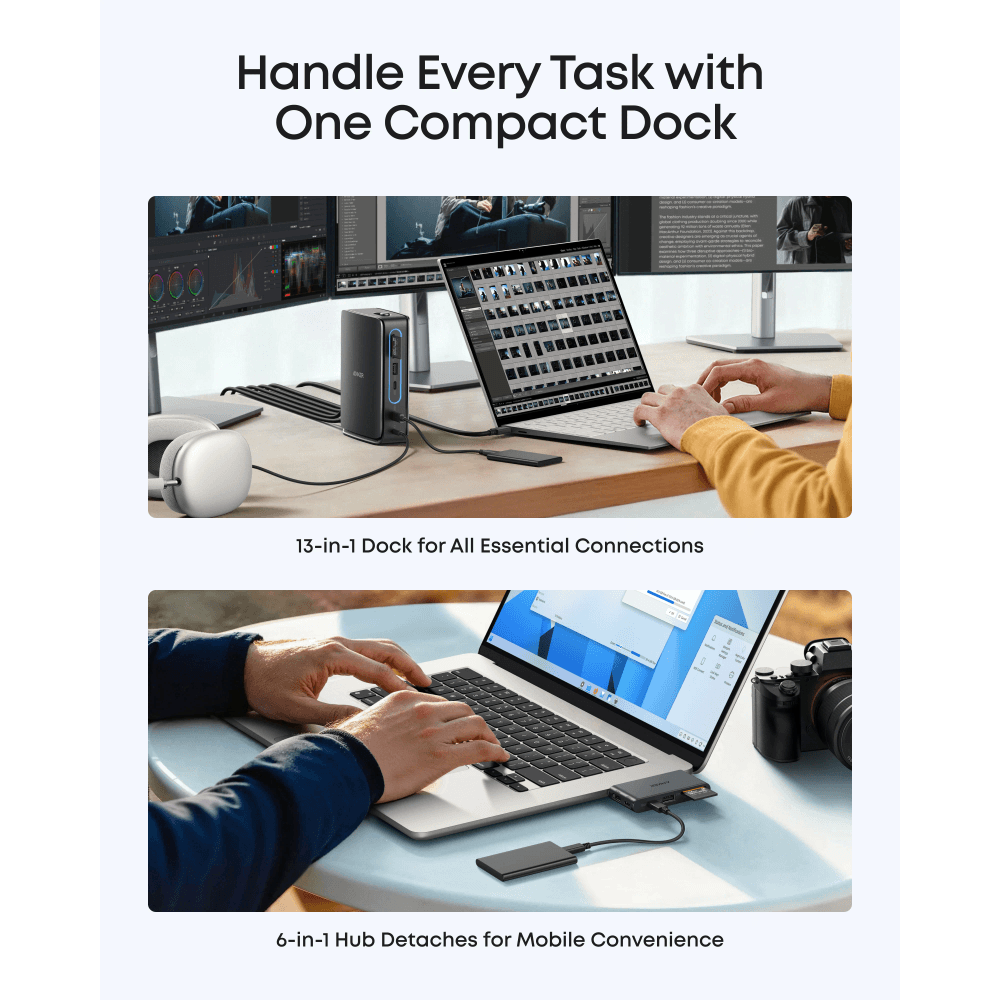
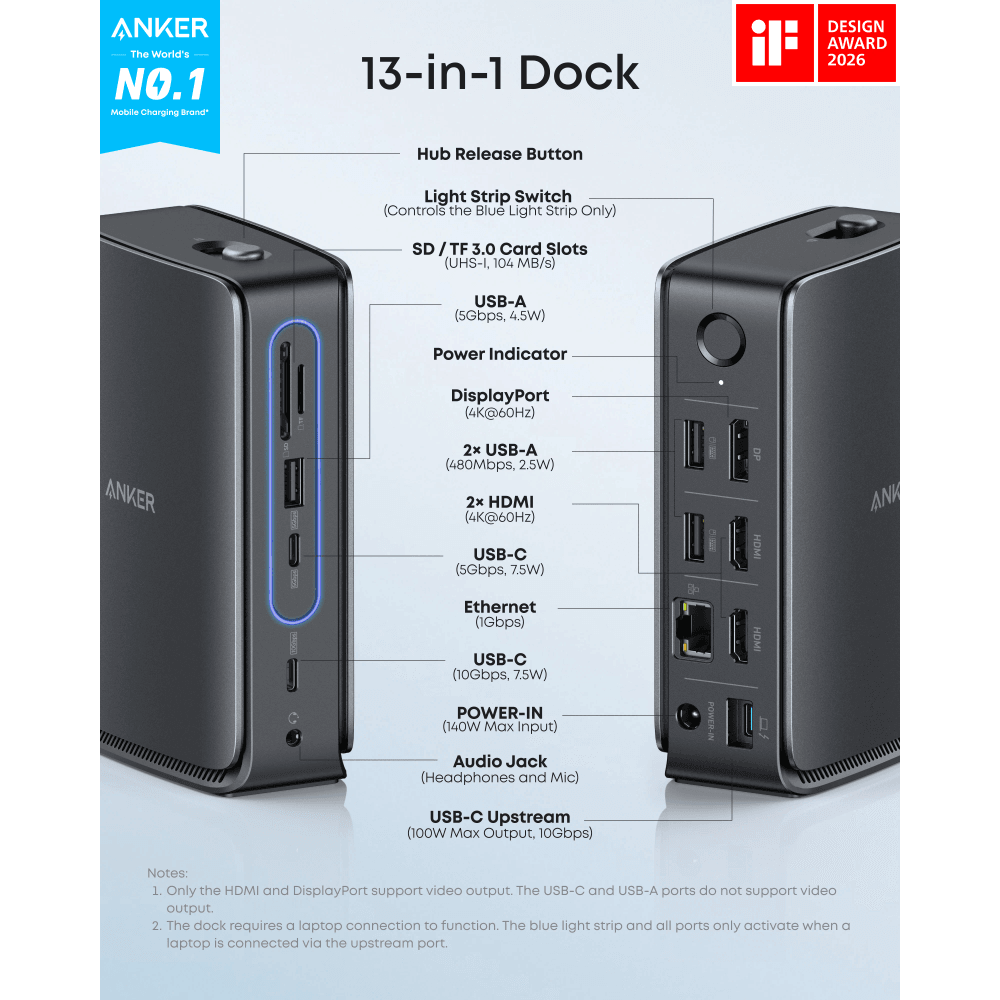
Expand your laptop’s capabilities instantly with a massive array of ports designed to handle every peripheral you own. The Anker Nano Docking Station includes dual HDMI and one DisplayPort for video, multiple USB-A and USB-C data ports for high-speed accessories, SD and microSD card readers for creatives, Gigabit Ethernet for stable internet, and a 3.5mm audio jack. Unlike basic adapters that force you to choose between ports, this all-in-one solution ensures you never have to unplug a device to connect another, streamlining your daily workflow and eliminating the need for multiple dongles.
Anker: Triple Display Support for Maximum Productivity
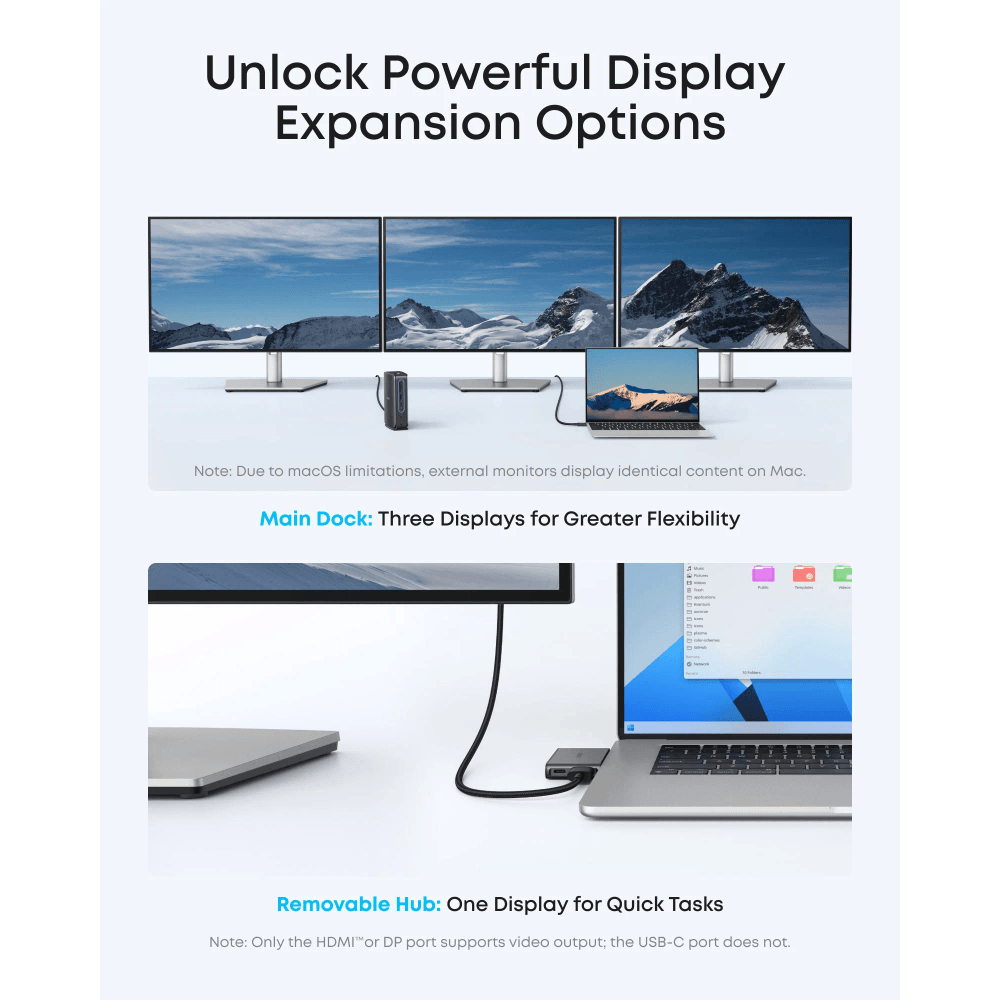
Transform your laptop into a centralized command center with true triple display support. By connecting up to three external monitors simultaneously, the Anker Nano Docking Station drastically expands your screen real estate, allowing you to keep reference materials, communication apps, and primary workspaces open at the same time. This multi-screen capability is essential for programmers, video editors, and financial analysts who rely on extensive visual data. Unlike dual-display docks that limit your setup, this station provides the immersive, multi-window environment required for peak professional performance.
Innovative Built-In Removable Hub
Experience unprecedented flexibility with the unique built-in removable hub design. The station functions as a full-featured desktop dock when seated at your desk, but the top section seamlessly detaches to become a compact, portable hub for travel or meetings. This means you can leave your monitors and heavy peripherals connected to the base while taking the essential ports with you on the go. Unlike traditional docks that tether you to one location, the Anker Nano Docking Station adapts to your dynamic schedule, providing both desktop power and mobile convenience in a single device.
100W Power Delivery for Seamless Charging
Keep your laptop powered throughout the most demanding workdays with high-wattage pass-through charging. The Anker Nano Docking Station supports up to 100W Power Delivery via its USB-C port, ensuring your notebook receives ample power to run intensive applications while simultaneously charging. This eliminates the need to plug in your laptop’s original power brick separately, reducing cable clutter and freeing up wall outlets. Unlike lower-wattage hubs that struggle to keep high-performance laptops charged under heavy loads, this station delivers reliable, sustained power for uninterrupted productivity.
Compact Desktop Design
The dock sits flat on the desk in a compact footprint. Note: this is a desktop dock, not a desktop dock — it does not raise or hold your laptop. Reviewers report it stays cool and runs silently under full load, with space underneath for storing your keyboard, mouse, or other desk accessories, contributing to a cleaner, more organized workspace. Unlike flat docking stations that leave your laptop sitting awkwardly on the desk, this integrated stand combines ergonomic comfort with functional workspace optimization.
High-Speed Data Transfer and Networking
Transfer large files, back up your projects, and connect to the internet with blazing-fast speeds. The USB-C and USB-A data ports support high-speed transfer rates, allowing you to move gigabytes of data in seconds, while the integrated Gigabit Ethernet port provides a stable, low-latency wired connection that outperforms Wi-Fi for video conferencing and large cloud uploads. Additionally, the UHS-I SD and microSD card readers offer quick access to camera footage and storage expansion. Unlike docks with slow USB 2.0 ports or unreliable wireless connections, this station ensures your data moves as fast as you do.
Compact, Space-Saving Workspace Solution
Despite its extensive feature set, the device maintains a remarkably compact footprint that fits neatly on any desk. The vertical, space-saving design minimizes the amount of surface area occupied, leaving more room for your mouse, notebooks, and other essentials. The premium aluminum alloy construction not only provides excellent heat dissipation to protect your connected devices but also adds a sleek, modern aesthetic that complements your laptop. Unlike massive, sprawling docking stations that dominate your desk, the Anker Nano Docking Station delivers maximum functionality in a minimal, elegant form factor.
Technical Specifications:
Model: Anker Nano Docking Station (A83C3)
Ports: 13-in-1 (2x HDMI, 1x DisplayPort, 2x USB-A, 2x USB-C data, 1x USB-C PD, 1x Ethernet, 1x SD, 1x microSD, 1x Audio)
Display Support: Triple Display (Resolution depends on host laptop capabilities, e.g., up to 4K@60Hz or 4K@30Hz)
Power Delivery: Up to 100W input (pass-through charging)
Data Transfer: Up to 10Gbps (USB-C), 5Gbps (USB-A)
Network: Gigabit Ethernet (RJ45)
Special Features: built-in removable 6-in-1 hub, triple display support, 100W PD pass-through, blue status light strip
Included: docking station, 1 m USB-C 3.1 Gen 2 cable rated 10 Gbps, 140W power adapter with a 1.5 m power cord, safety sheet
Color: Space Gray / Silver
Certifications: CE, FCC, RoHS compliant
Warranty: 1-year warranty from Totot
Who Is This For?
Remote Professionals & Office Workers: Triple display support + 13-in-1 connectivity ideal for creating a powerful, desktop-like workspace at home or in the office without cable clutter.
Multi-Monitor Enthusiasts: Dual HDMI + DisplayPort + Gigabit Ethernet perfect for programmers, traders, and analysts who rely on extensive screen real estate and stable network connections.
Digital Nomads & Travelers: Built-in removable hub + compact design ideal for users who need a full desktop setup at the hotel but only want to carry a lightweight hub for meetings.
Content Creators: SD/microSD readers + high-speed USB data ports + 100W PD perfect for photographers and videographers who need to quickly offload footage while keeping their laptop charged.
Why It Stands Out:
Triple Display Support: Connect up to three external monitors simultaneously vs. standard docks that only support one or two displays.
Built-In Removable Hub: Detachable top section for travel vs. fixed docking stations that force you to carry the entire bulky unit or buy a separate travel adapter.
13-in-1 Comprehensive Layout: Massive port selection including DisplayPort and Gigabit Ethernet vs. basic hubs that lack essential desktop peripherals.
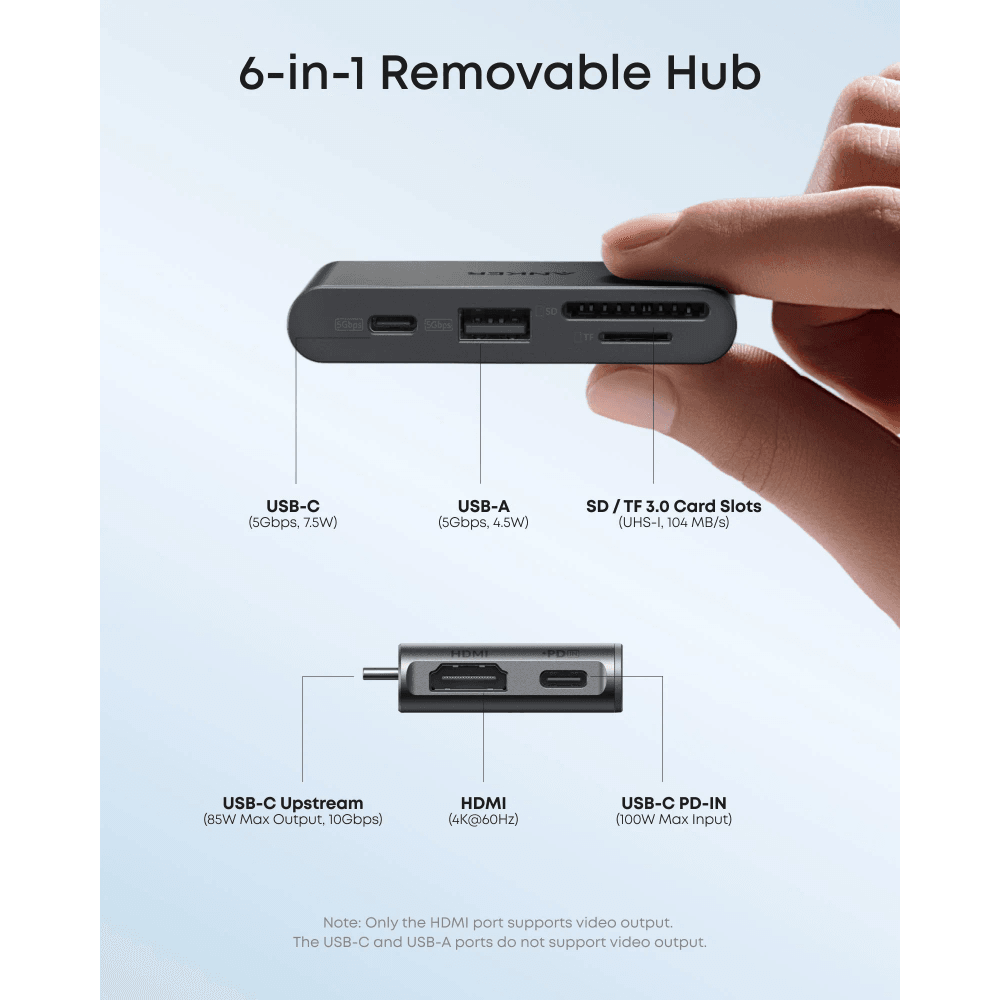
Removable Hub: part of the dock detaches as a pocket-sized 6-in-1 hub, while the main dock keeps working — no replugging.
100W Power Delivery: High-wattage pass-through charging for demanding laptops vs. lower-wattage hubs that struggle to maintain battery under heavy loads.
Bullet Points:
- 13-in-1 Comprehensive Connectivity: Instantly expand your laptop with dual HDMI, DisplayPort, USB-A, USB-C data, Gigabit Ethernet, SD/microSD readers, and audio jack to handle every peripheral without swapping dongles.
- Triple Display Support: Connect up to three external monitors simultaneously to drastically expand your screen real estate, enabling immersive multi-window workflows for maximum productivity.
- Innovative Built-In Removable Hub: The top section seamlessly detaches to become a compact, portable hub for travel, allowing you to leave heavy peripherals connected to the base while taking essential ports on the go.
- 100W Power Delivery Pass-Through: Supports up to 100W charging via USB-C to keep your high-performance laptop powered throughout demanding workdays without needing a separate power brick.
- Compact Desktop Design: a small footprint that stays cool and silent under full load, with valuable space underneath for keyboard and mouse storage.
- High-Speed Data and Networking: Transfer files at up to 10Gbps via USB-C and enjoy stable, low-latency internet connections through the integrated Gigabit Ethernet port for seamless video conferencing.
- Compact, Space-Saving Aluminum Build: Premium aluminum alloy construction provides excellent heat dissipation and a sleek aesthetic while maintaining a minimal footprint to keep your desk organized.
Official Source for Verification:
Official Anker Nano Docking Station Specifications
Technical Specifications
- Model: Anker Nano Docking Station, 13-in-1 with built-in removable hub (A83C3)
- Dock ports: USB-C upstream, 2 x USB-C data, 3 x USB-A data, 2 x HDMI, 1 x DisplayPort, Gigabit Ethernet, 3.5mm audio jack, SD and TF card slots, DC input
- Removable 6-in-1 hub: 7.5W USB-C data port, 4.5W USB-A port, HDMI at 4K/60Hz, SD and microSD slots, USB-C upstream and power in
- Laptop charging: up to 100W Power Delivery through the upstream port
- Power adapter: 140W included, with a 1.5 m built-in power cord
- Data speed: up to 10 Gbps over USB-C
- Video output: up to 4K at 60Hz with a laptop and monitor that support DisplayPort 1.4 and DSC. Only the HDMI and DisplayPort outputs carry video — the USB-C and USB-A ports do not
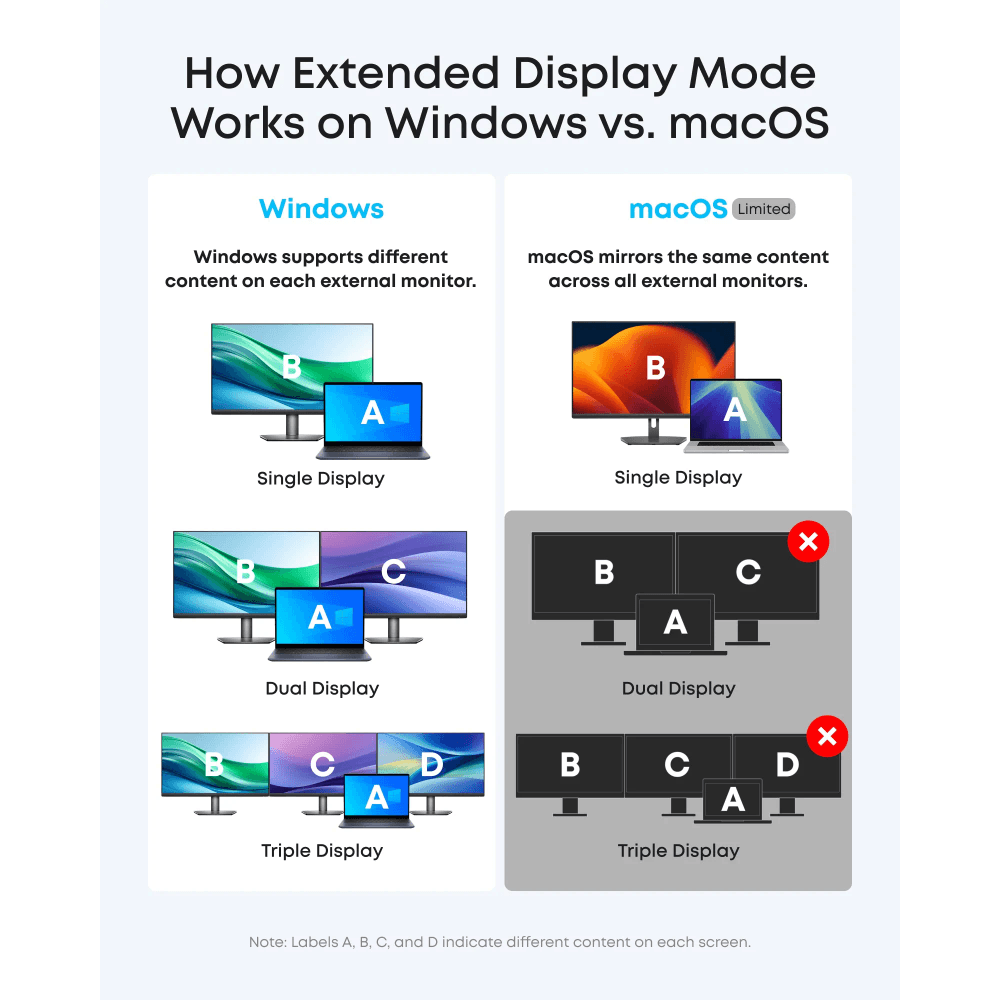
- macOS limitation: on macOS all external monitors mirror the same content; only one can show different content, regardless of the dock
- Laptop requirements: the USB-C port must support DP Alt Mode for video and Power Delivery for charging
- Operating systems: Windows 10 and 11, or macOS 13.5 or later
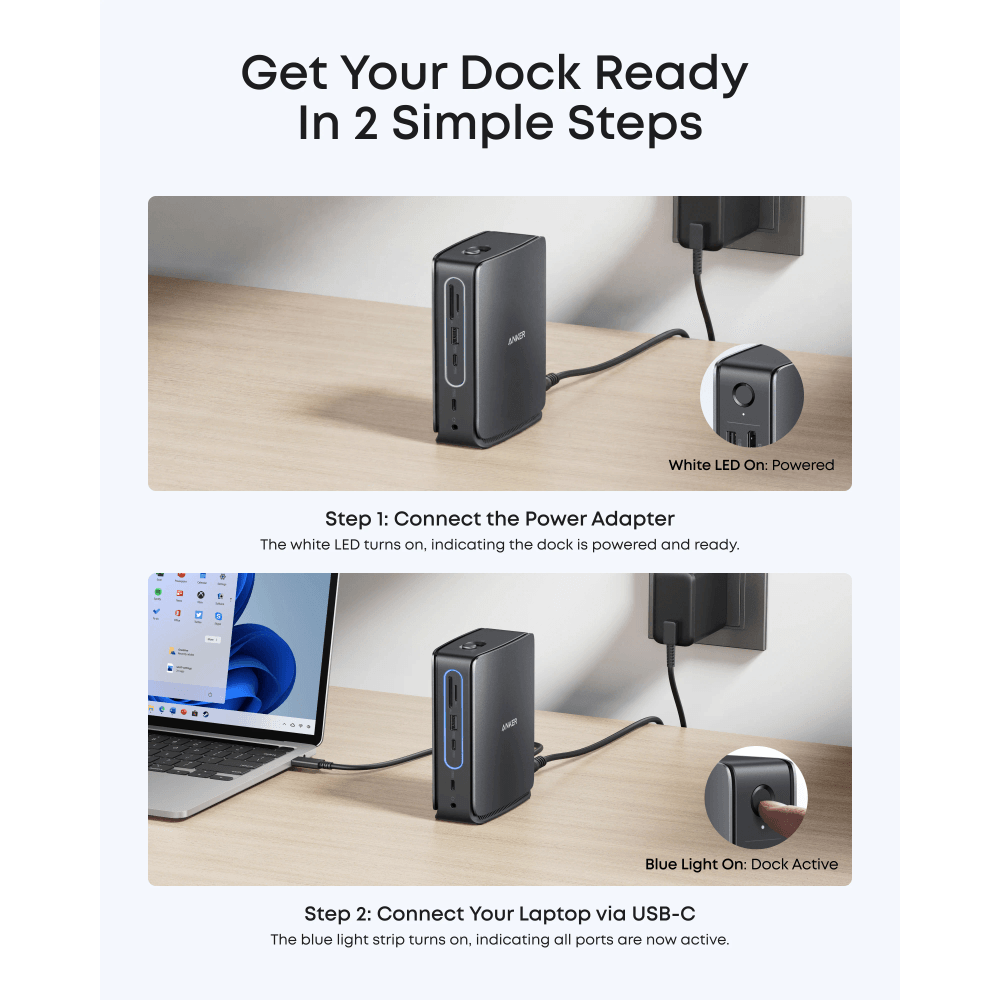
- Important: the dock needs a laptop connected to work. The blue light strip and all ports only activate once a laptop is connected through the upstream port
- Note on per-port charging: the downstream ports deliver modest power (7.5W and 4.5W on the hub) — use a proper charger for phones and tablets
- In the box: docking station, 1 m (3.3 ft) USB-C to USB-C 3.1 Gen 2 cable rated 10 Gbps, 140W power adapter with a built-in 1.5 m power cord, safety sheet
- Port output: USB-C upstream up to 100W (5V/3A, 9V/3A, 15V/3A, 20V/5A); USB-A1 4.5W; USB-A2 2.5W
- Adapter input: 100–240V, 2.5A, 50/60Hz — works on UAE mains
- Size: Anker does not publish the dock’s dimensions or weight. Independent testing puts the detachable hub at about 8 cm long and 1.4 cm thick — small enough for a laptop bag
- Cable advice: Anker recommends using the included USB 3.2 Gen 2 cable — other cables can cause compatibility problems
- Warranty: 1 year from Totot plus Anker’s 18-month manufacturer warranty
Frequently Asked Questions
Where can I buy the Anker Nano Docking Station 13-in-1 in the UAE?
At Totot.ae, with fast Aramex delivery across the UAE, Tabby and Tamara payment options and a 14-day return policy.
Does it come with a warranty?
Yes. Every unit sold by Totot includes a 1-year warranty from Totot.
Browse more in our Computer Accessories range to compare options side by side before deciding.
Worth comparing against the Anker Nano 100W USB-C Charger – MacBook/iPad/iPhone/Galaxy, 6ft Cable Included, GaN Technology, Compact Travel Adapter, which suits a slightly different buyer.
The FAQ – Anker Nano Docking Station 13-in-1
Can it really run three displays?
Yes on Windows laptops with sufficient graphics support. macOS limits multiple external displays on some Apple silicon models regardless of the dock.
What does the removable hub do?
Part of the dock detaches as a portable hub, so a few ports can travel in a bag while the full dock stays on the desk.
Does it charge the laptop?
Yes, power delivery passes through to the laptop while displays and peripherals run at the same time.
Will 13 ports slow anything down?
Bandwidth is shared across the USB-C connection, so running three 4K displays plus fast storage simultaneously can reduce refresh rates or transfer speeds.
Does it need external power?
Yes, a docking station of this scale requires its own power supply to serve displays, peripherals, and laptop charging together.
Does Totot deliver across the UAE?
Yes. We ship nationwide via Aramex for a fixed AED 10, with cash on delivery, Tabby and Tamara payment options available at checkout, so it reaches you anywhere in the country.
من نفس العلامة التجارية







 No products in the cart.
Reviews
There are no reviews yet