
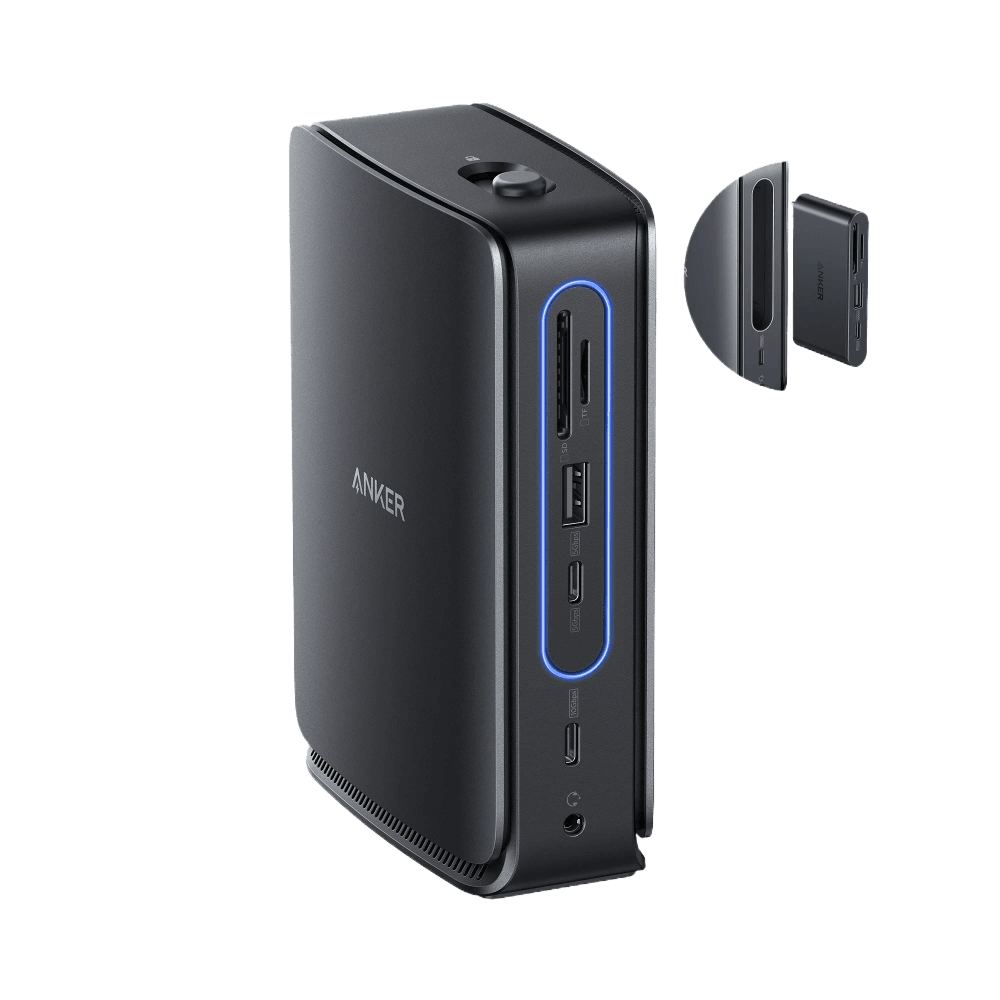
The Anker Nano Docking Station 13-in-1 (model A83C3) turns one USB-C port on a laptop into a full desk setup: up to three external displays on Windows, up to 100W of charging back to the laptop, wired Gigabit Ethernet, SD and microSD readers, audio and a row of USB ports. Its standout feature is a 6-in-1 hub that slides out of the dock, so the ports you use at the desk can come with you in a laptop bag. Anker supports Windows 10/11 and macOS 13.5 or later, with one important limit on Mac: external screens mirror rather than extend.
Contents
Thirteen ports from one cable
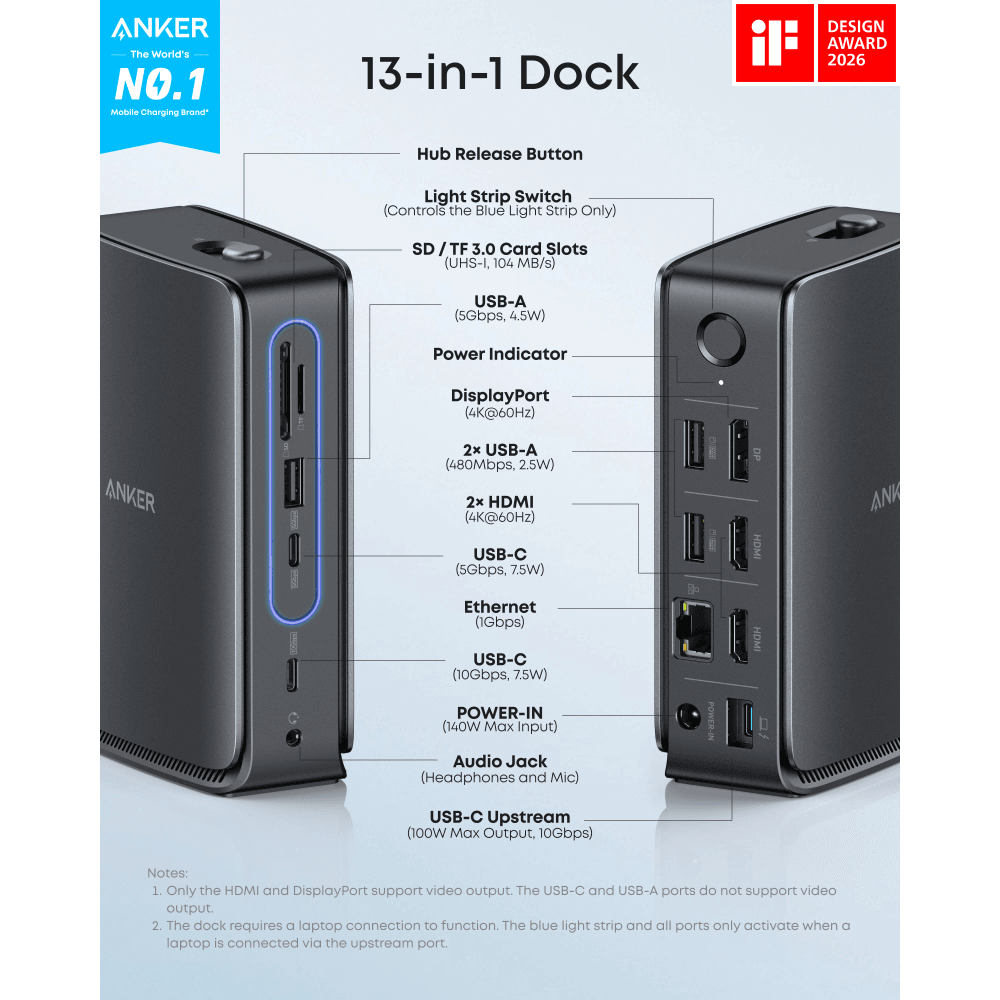
Anker’s support page lists the docking module with HDMI and DisplayPort outputs at 4K@60Hz, a 1Gbps Ethernet port, a 3.5 mm audio in/out jack, two USB-A ports at 480Mbps, one USB-C data port at 10Gbps, and the upstream USB-C link to the laptop, which also delivers up to 100W. The two 480Mbps USB-A ports run at USB 2.0 speed, fine for a keyboard, mouse or wireless dongle but slow for drives, so plug an SSD into the 10Gbps USB-C port instead. Anker notes that the downstream ports supply standard power for running devices but are not intended to charge them, so the Anker Nano Docking Station 13-in-1 is not a phone charger.
The removable 6-in-1 hub
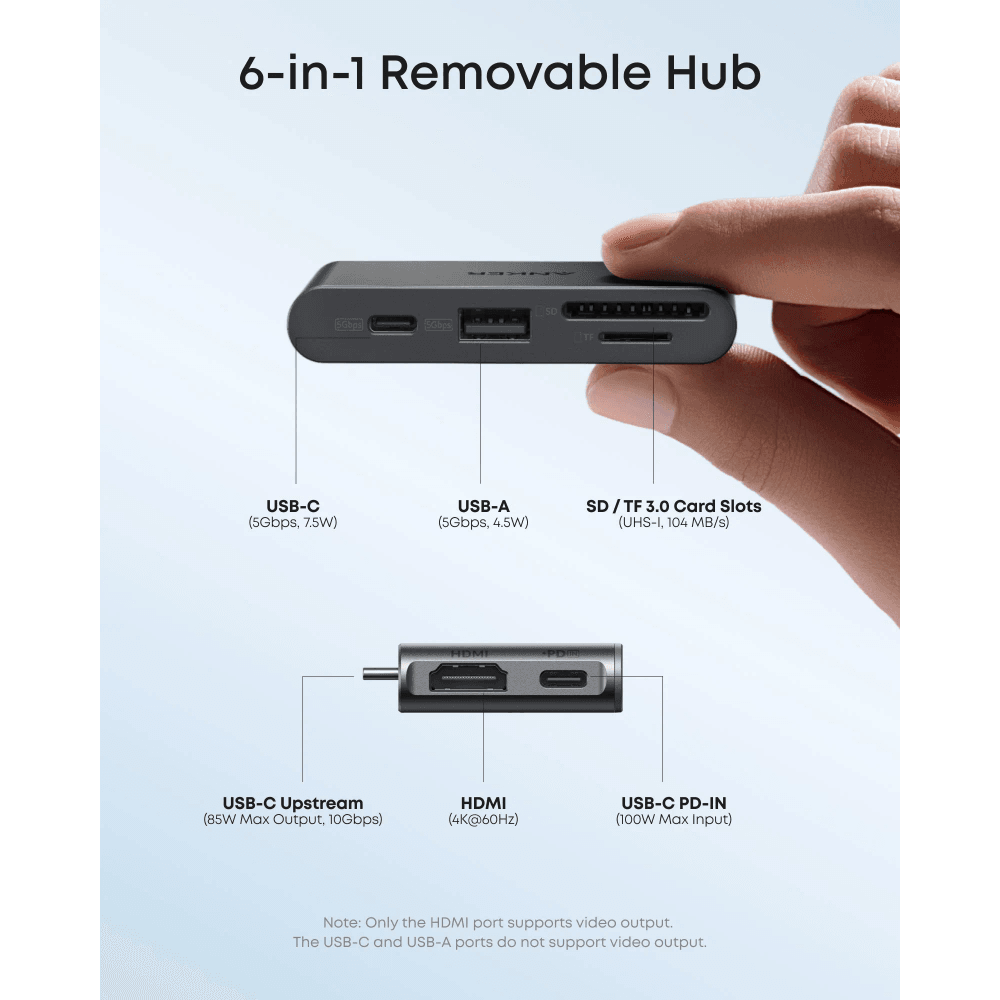
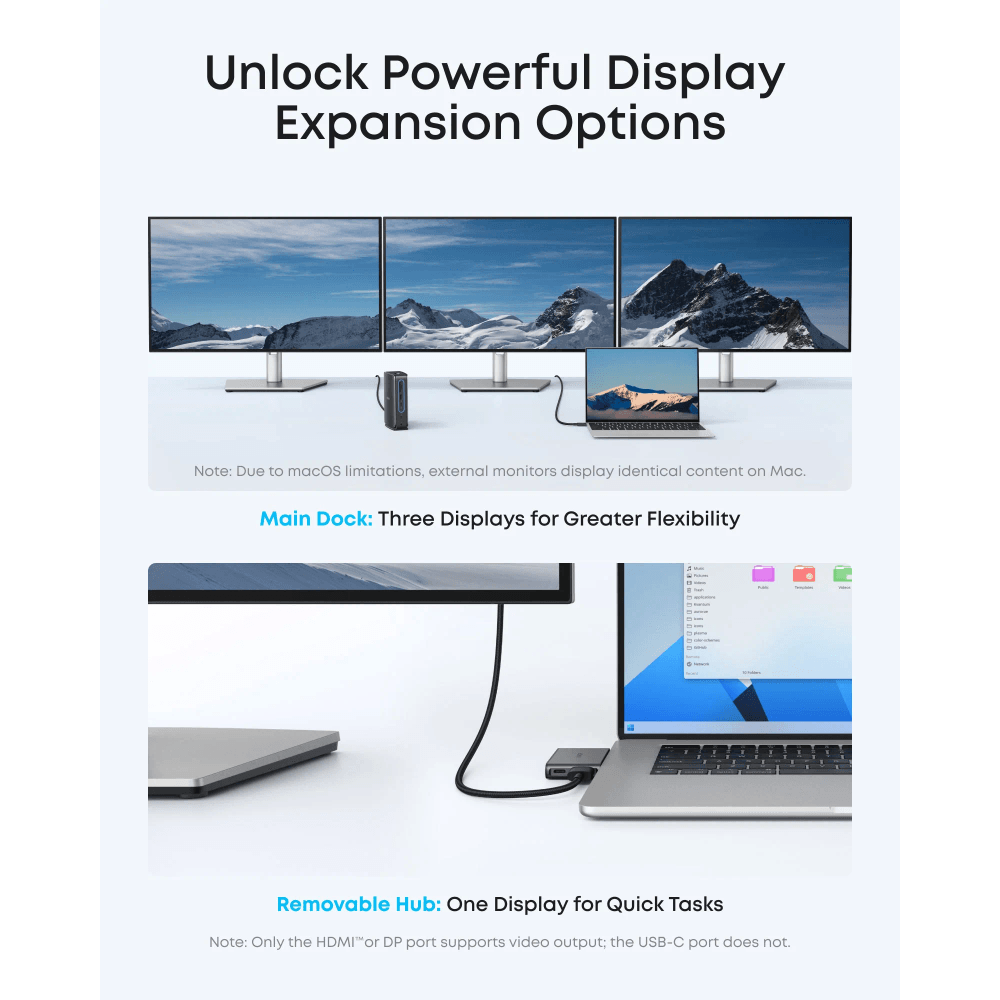
The hub that slides out of the Anker Nano Docking Station 13-in-1 carries HDMI at 4K@60Hz, a 5Gbps USB-C port, a 5Gbps USB-A port, SD and microSD (TF) slots, and a USB-C power input. In the morning you pull it out and you have a small travel hub for a hotel TV, a meeting-room projector or a camera card; in the evening you slide it back and it becomes part of the desk setup again. Anker’s Singapore store lists the hub at 8 × 4.19 cm and 36 g, so it disappears into a bag pocket, while the dock itself measures 14 × 9.5 × 4 cm and weighs 408 g.

Three screens on Windows, mirroring on Mac
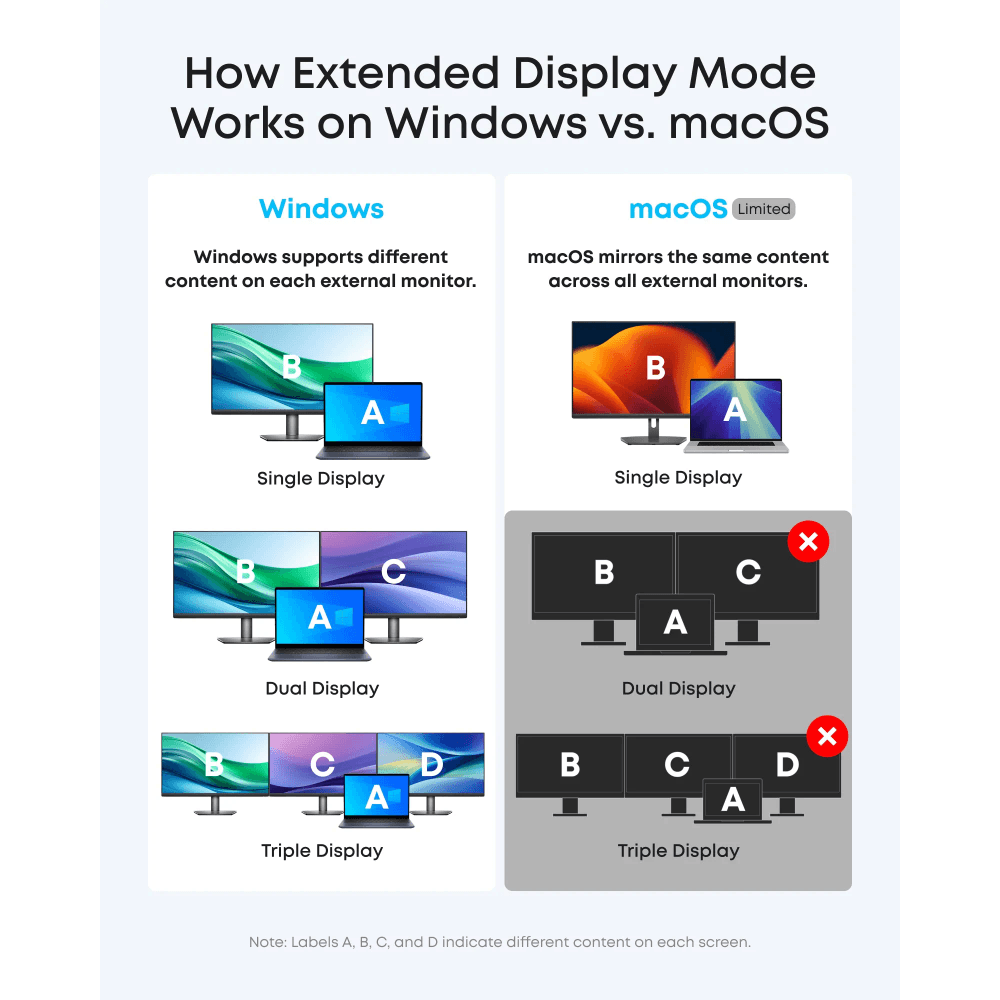
On Windows 10 and 11 the Anker Nano Docking Station 13-in-1 can drive up to three external displays through its HDMI and DisplayPort outputs, each up to 4K@60Hz. Only those outputs carry video; the USB-C and USB-A ports are for data and will not run a USB-C monitor. Anker adds that dual 4K@60Hz needs both the laptop and the monitors to support DSC, and suggests checking the Intel graphics control centre for how many displays the laptop itself can drive. On macOS, Anker states for the Anker Nano Docking Station 13-in-1 that all external monitors mirror the same screen, so a MacBook gets one image repeated rather than an extended desktop.
What your laptop needs
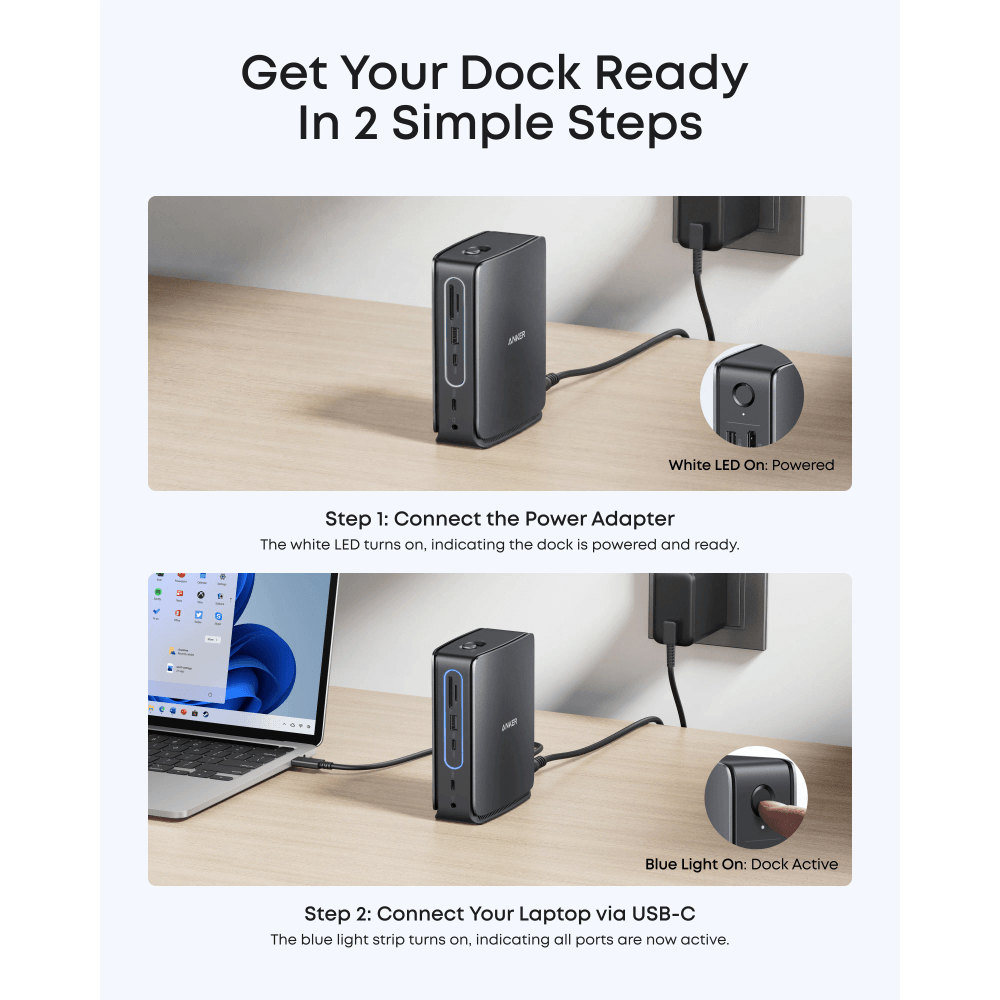
The laptop’s USB-C port must support DisplayPort Alt Mode for video and Power Delivery for charging; a data-only USB-C port will give neither. Anker asks you to use the included USB-C cable, because other cables may cause compatibility problems. Laptops that need 100W or less charge at the same speed as with their own adapter. The Anker Nano Docking Station 13-in-1 runs from an included 140W adapter (100–240V, 50–60Hz), so it works on UAE mains without a converter. Anker states the dock is not compatible with Linux, and the ports and blue light strip switch on only once a laptop is connected through the upstream port.
In the box and day-to-day use
Anker’s regional store lists the dock with its detachable hub, a 1 m USB-C to USB-C cable, the 140W power adapter with a 1.5 m cord, and a safety sheet with a QR code for the manual. In daily use the Anker Nano Docking Station 13-in-1 suits a hybrid worker: monitors, wired network, keyboard, mouse and speakers stay plugged into the dock at home or in the office, and one cable connects the laptop when you sit down. The blue light strip confirms the dock is powered and connected, which saves guessing when a screen stays dark.
Who This Is Not For
The Anker Nano Docking Station 13-in-1 is not for Mac users who want two or three separate extended monitors: Anker states that macOS mirrors all external screens, so a DisplayLink or Thunderbolt dock suits that need better. Linux laptops are not supported. Laptops that draw more than 100W will not be fully powered through it, and laptops whose USB-C port lacks DisplayPort Alt Mode get no video at all. Its USB ports are not meant to charge phones, and if you only need one extra screen and a couple of USB ports, a simple USB-C hub costs far less.
Ordering from Totot
Totot sells the Anker Nano Docking Station 13-in-1 brand-new and genuine in its sealed box, backed by a 1-year warranty from Totot. It reaches any emirate within 3 business days at most, with free delivery on orders from AED 300, with cash on delivery or instalments via Tabby and Tamara. Items that arrive defective or not as ordered can be returned within 14 days, and any shipping damage should be reported within 48 hours of delivery. Browse more in our Computer Accessories range, or see the official Anker Nano Docking Station (A83C3) page.

Anker Nano Docking Station 13-in-1 Specifications
- Model: Anker Nano Docking Station (13-in-1, Triple Display, Built-In Removable Hub), A83C3
- Dock ports: HDMI 4K@60Hz, DisplayPort 4K@60Hz, 1Gbps Ethernet, 3.5 mm audio in/out, 2 × USB-A 480Mbps, 1 × USB-C 10Gbps data, upstream USB-C to laptop
- Removable hub: HDMI 4K@60Hz, USB-C 5Gbps, USB-A 5Gbps, SD, microSD (TF), USB-C power input
- Displays: Up to three on Windows 10/11; dual 4K@60Hz requires DSC on laptop and monitors; macOS mirrors all external monitors
- Video ports: HDMI and DisplayPort only; USB-C and USB-A ports carry data only
- Laptop charging: Up to 100W
- Power adapter: 140W, 100–240V AC, 50–60Hz (included)
- Downstream ports: Standard power for operation, not for charging devices
- Laptop requirements: USB-C with DisplayPort Alt Mode and Power Delivery
- Operating systems: Windows 10/11, macOS 13.5 or later; not compatible with Linux
- Dock size and weight: 14 × 9.5 × 4 cm, 408 g
- Hub size and weight: 8 × 4.19 cm, 36 g
- In the box: Dock with removable hub, 1 m USB-C to USB-C cable, 140W adapter, safety sheet
- Warranty: 1-year warranty from Totot
Anker Nano Docking Station 13-in-1 FAQ
Can the Anker Nano Docking Station 13-in-1 run three extended monitors on a MacBook?
No. Anker states that on macOS all external monitors mirror the same screen; extended triple display is for Windows.
Does it charge my laptop?
Yes, up to 100W, provided the laptop’s USB-C port supports Power Delivery.
Is the power adapter included?
Yes. A 140W adapter rated 100–240V is in the box, along with a 1 m USB-C cable.
Can I charge my phone from the dock’s USB ports?
No. Anker says the downstream ports supply standard power for operation and do not support device charging.
Will a USB-C monitor work through the USB-C port?
No. Only the HDMI and DisplayPort outputs carry video.
Does the Anker Nano Docking Station 13-in-1 work with Linux?
No. Anker lists Windows 10/11 and macOS 13.5 or later and states Linux is not supported.
Is it genuine?
Yes. We sell the genuine Anker Nano Docking Station 13-in-1 (A83C3), brand-new in its sealed box.
How long does delivery take?
3 business days at most across the UAE. Orders from AED 300 ship free, and the checkout page shows any current fee for your order.




 No products in the cart.

Reviews
There are no reviews yet