

A Magic Keyboard turns an iPad Pro 13-inch into something you can write on all day, but it is not a universal accessory. The single most important thing to settle before you buy is fit: Apple builds this unit for the iPad Pro 13-inch and for nothing else, and the list of iPads it works with is two models long.

Table of Contents
What Apple Actually Publishes About This Keyboard
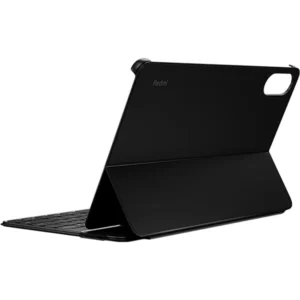
Apple names four things that define this generation. A 14-key function row handles screen brightness, volume and other controls from the keyboard instead of the screen. A built-in larger glass trackpad adds haptic feedback. The keys are backlit and sit on a scissor mechanism with 1 mm of travel. And the palm rest is aluminium. That 1 mm figure is key travel, not the thickness of anything: it is how far each key moves before it stops, and it is the difference between typing and tapping glass.
The hinge is machined aluminium and carries a USB-C connector for pass-through charging. In practice that means the charging cable lives at the back of the keyboard and the port on the iPad Pro 13-inch itself stays free for a drive or an external display. The whole assembly folds into a case that covers the front and the back for travel.
Exactly Which iPads the iPad Pro 13-inch Magic Keyboard Fits
Apple publishes a compatibility list with two entries on it: iPad Pro 13-inch (M5) and iPad Pro 13-inch (M4). That is the entire list. Apple currently sells this keyboard under the M5 name, and the same unit covers the M4 generation, so an M4 owner is buying the right accessory even though the box may say M5.
It does not fit the iPad Pro 11-inch in any generation, because the body is a different size, and the 11-inch keyboard does not fit a 13-inch iPad either. It does not fit the iPad Air 13-inch or the iPad Air 11-inch; Apple sells a separate Magic Keyboard designed for iPad Air, and that is what an Air needs. It does not fit the standard iPad, the iPad mini, or any of the older 12.9-inch iPad Pro models. There is a software floor as well: Apple states the keyboard requires iPadOS 17.4 or later.
The US English Layout, and When It Is the Wrong Pick
This unit is the US English layout in black. Latin characters are printed on the keys, the arrow cluster is the inverted-T shape, and the function row runs along the top. Anyone who has typed on a MacBook bought in the United States will find every key where they expect it.
It is the wrong pick if you write in Arabic every day. Apple prints a separate Arabic layout for the same keyboard, and no software setting puts Arabic letters onto keys that do not carry them. An iPad Pro 13-inch will type Arabic quite happily with a US English keyboard attached, but you will be doing it from memory rather than reading the keycaps.
Attaching, Charging and the Trackpad
Attachment is magnetic. Apple describes these keyboards as attaching to iPad magnetically with no need for switches, plugs, and pairing, which means there is no Bluetooth setup step and nothing to re-pair after the iPad restarts.
The trackpad is glass with haptic feedback, designed for Multi-Touch gestures and the cursor in iPadOS. Apple does not publish a trackpad size, a keyboard weight or any dimensions for this accessory, and we are not going to fill the gap with a guess. If the exact travel weight of your bag matters to you, treat those numbers as unpublished rather than trusting a figure from a third party.
Who This Is Not For
It is not for an iPad Air owner, an iPad mini owner, someone on the standard iPad, or anyone with an iPad Pro 11-inch or an older 12.9-inch iPad Pro. Compatibility here is two models wide, and a keyboard that does not fit is not a bargain at any price.
It is not for Arabic-first typists, who should buy the Arabic layout of the same keyboard instead. It is not for anyone stuck below iPadOS 17.4 with no route to updating. And it is not for someone who mainly wants screen protection on a tight budget: this is a full keyboard and trackpad at a keyboard and trackpad price, and a plain folio costs a small fraction of it.
Buying From Totot in the UAE
Shipping is free on orders from 300 AED upward. Delivery takes up to 3 business days. Every order carries 1 year of warranty from Totot.
Returns stay open for 14 days on an item that arrives defective or does not match what was ordered. If the box turns up damaged in transit, tell us within 48 hours of delivery so we can handle it as shipping damage.
Technical Specifications
- Model: Apple Magic Keyboard for iPad Pro 13-inch
- Keyboard layout: US English (Latin characters), black finish
- Compatibility: iPad Pro 13-inch (M5) and iPad Pro 13-inch (M4) only
- Software requirement: iPadOS 17.4 or later
- Function row: 14 keys, for screen brightness, volume and other controls
- Key mechanism: Backlit keys, scissor mechanism, 1 mm travel
- Trackpad: Built-in larger glass trackpad with haptic feedback, for Multi-Touch gestures and the iPadOS cursor
- Hinge and port: Machined aluminium hinge with a USB-C connector for pass-through charging
- Palm rest: Aluminium
- Stand design: Cantilever, adjustable viewing angles; folds into a case covering front and back
- Attachment: Magnetic, with no switches, plugs or pairing
- Trackpad size: Not published by Apple
- Weight and dimensions: Not published by Apple
- Warranty: 1 year from Totot
Every specification above comes from Apple: the UAE Apple Store listing for this keyboard and the Apple Support technical specifications page. Full details are published on the Apple Support technical specifications for the Magic Keyboard for iPad Pro 13-inch.
FAQ
Does this keyboard fit the iPad Pro 11-inch (M4)?
No. Apple lists this keyboard for the iPad Pro 13-inch (M5) and the iPad Pro 13-inch (M4) only. An 11-inch iPad Pro needs the 11-inch keyboard, and the two sizes are not interchangeable in either direction.
Will it work with an iPad Air 13-inch?
No. Apple’s compatibility list for this keyboard contains no iPad Air model at all. Apple sells a separate Magic Keyboard built for iPad Air, and that is the one an iPad Air needs.
How many keys are in the function row?
14. Apple describes it as a 14-key function row for quick access to screen brightness, volume controls and other features.
Does it need a particular version of iPadOS?
Yes, iPadOS 17.4 or later. Apple states this as a system requirement, so update the iPad Pro 13-inch before the keyboard arrives if it is running anything older.
Can the iPad charge through the keyboard?
Yes. The machined aluminium hinge carries a USB-C connector for pass-through charging, which leaves the USB-C port on the iPad itself free while you type.
How much does this Magic Keyboard weigh?
Apple does not publish a weight or dimensions for this keyboard, so we cannot give you a figure. Any number quoted elsewhere did not come from Apple.
What warranty and returns apply?
1 year of warranty from Totot against manufacturing defects, plus 14 days to return an item that arrives defective or does not match the order.
Browse more in our Tablets range. Every order from Totot carries a 1-year warranty covering manufacturing defects, with our 14-day return policy for defective or non-compliant items, and nationwide UAE delivery.





 No products in the cart.

Reviews
There are no reviews yet